Case Study: User Interaction for AI Integrations

Context
Leo AI is the world’s first engineering design co-pilot. Deep-learning researchers building the world’s first Large Mechanical Model (LMM), the proprietary foundational model at the core of Leo. Equipped with domain-specific capabilities to design concepts, answering technical questions, finding parts in the PLM or websites of authorized vendors, and collaborating with fellow engineers. All integrated into CAD editors.
The Niche*
- 337k Mechanical Engineers just in the US.
- 421 billion USD Mechanical Engineer market size.
- 9949 of Mechanical Engineer companies registered in the US.
- 77% of companies are exploring the use of AI for their business.
*Data from US Bureau of Labor, Statista, and Crunchbase.
The User
- 18K Users.
- 17% Recurring users.
- 16.6% Paid Users.
- 6% Enterprise tier clients.
From this data we can interfere that the majority of the active users belong to a team in an organization, share information with their peers and that they use the product on a paid plan provided by the company they work for.
Objectives
Design the whole user experience of Leo’s add-ons for CAD editors. An add-on is a product that works inside another product’s ecosystem.
The Challenge
Design an end-to-end user experience for a system that will work inside another system, working along with it by retrieving, modifying and analyzing information built in the parent system, which has its own UX and UI.
The Goal
- Design end-to-end user experience for the add-ons.
- Document all specifications in a clear way, so developers can implement this update.
Methodologies
- Research about the user experience of the parent system (CAD editors).
- Built a user flow taking into account their own workflow in the parent system.
- Prototyping.
The Team
Product Designer, Product Manager, CTO.
Research
CAD editors are tools used by mechanical engineers to build and design models of any project they are working on, and have specific data like measurements, shapes, assemblies, etc. that later can be used in the manufacturing process. This software has the capacity of working along with plugins that expand the capabilities of the tool and add specific functions that users may require.
Research Methodologies
Using a CAD editor myself was the obvious way to start research, but since I’m not a mechanical engineer, I wouldn’t be familiar with day-to-day tasks on this kind of products, and it can cause me to overlook the pains and frustrations that users undergo when using this type of software. SO I took a different approach.
- Talk with a few mechanical engineers to understand how they work on CAD editors. What user experience they are used to in this kind of systems and what pains they encounter while using add-ons in this type of systems.
- Watch video tutorials of users interacting with the product, using add-ons and solving problems of their own professional tasks.
Research Findings, How Might We
- Offer a user experience that’s feels unified with the CAD editor’s experience.
- Show clearly which specific tasks the add-on can help with (avoid confusion with other add-ons).
- Keep design consistency between Leo’s solo app and add-ons.
User Flow
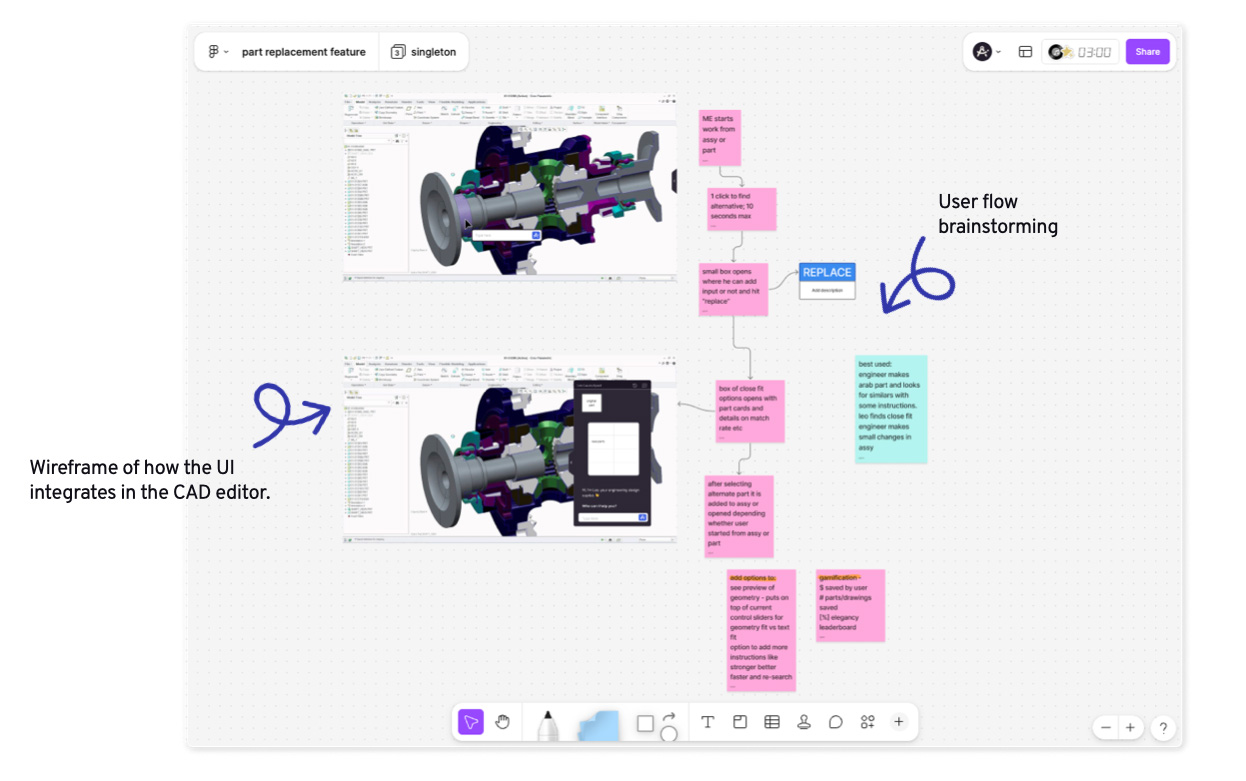
Product Design and Product Manager worked together on a basic flow and wire framing to show how the interface integrates into the CAD editor and what is the intended workflow that the Leo add-on is aiding the user for.
Definitions
Before designing a prototype, a few definitions were made to establish a set of rules that will guide the look and feel of the add-ons. First, Leo’s App Design System will be kept as “source of truth” for the design line. Other definitions are specified below.
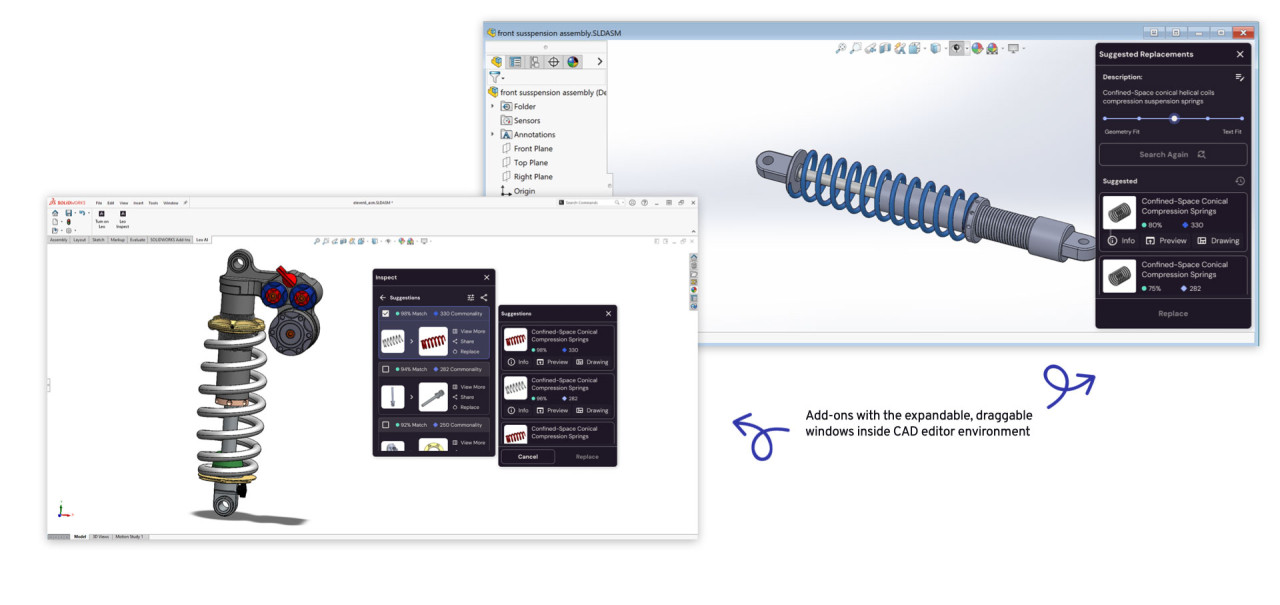
Expandable Windows
The previously defined expendable windows will be the basic container for the add-ons UI, following the rules established in such task.
Iconography
CAD editors have their own visual language, and while the UI may seem outdated, to some for not falling in line with the minimalistic software design of the latest years, it is still widely used and its users are already familiar with the environment of products like Solidworks, a name that has been around since the mid 90’s.
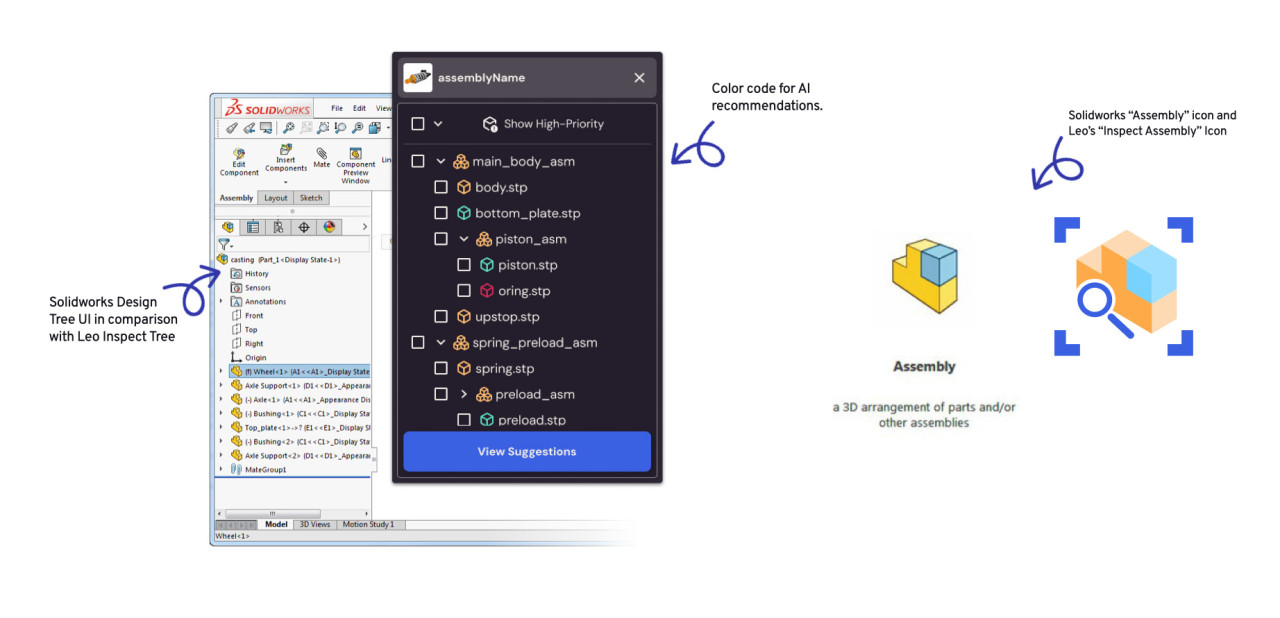
Finding balance between CAD editors mechanical engineer language (both written and visual) and Leo’s branding was key too the success of the task . That’s why I worked on icons that would resemble Solidworks iconography, with a refresh, based on Leo’s Design System.
Color Code
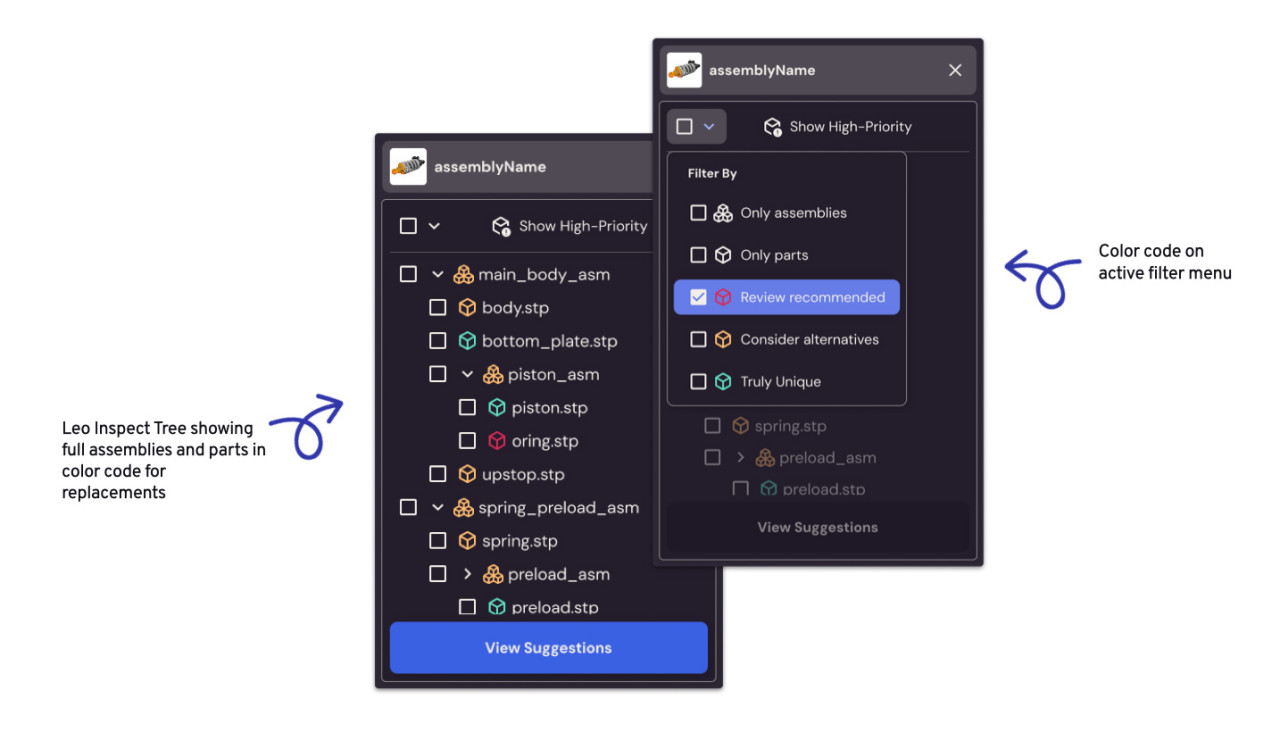
Leo AI’s add-ons use artificial intelligence to identify parts of an assembly, either single or as a whole system, and suggest replacements for better performance, cost optimization, or compliance, all based in the users data. By defining a color code, the user will be able to visually identify which parts are strongly suggested to be replaced, which suggestions are less critical, and which already qualify with the knowledge base directives.
Expandable Windows
Iconography
Color Code
Defining a color code, the user will be able to visually identify which parts are strongly suggested to be replaced, which suggestions are less critical, and which already qualify with the knowledge base directives.
Prototyping & Microinteractions
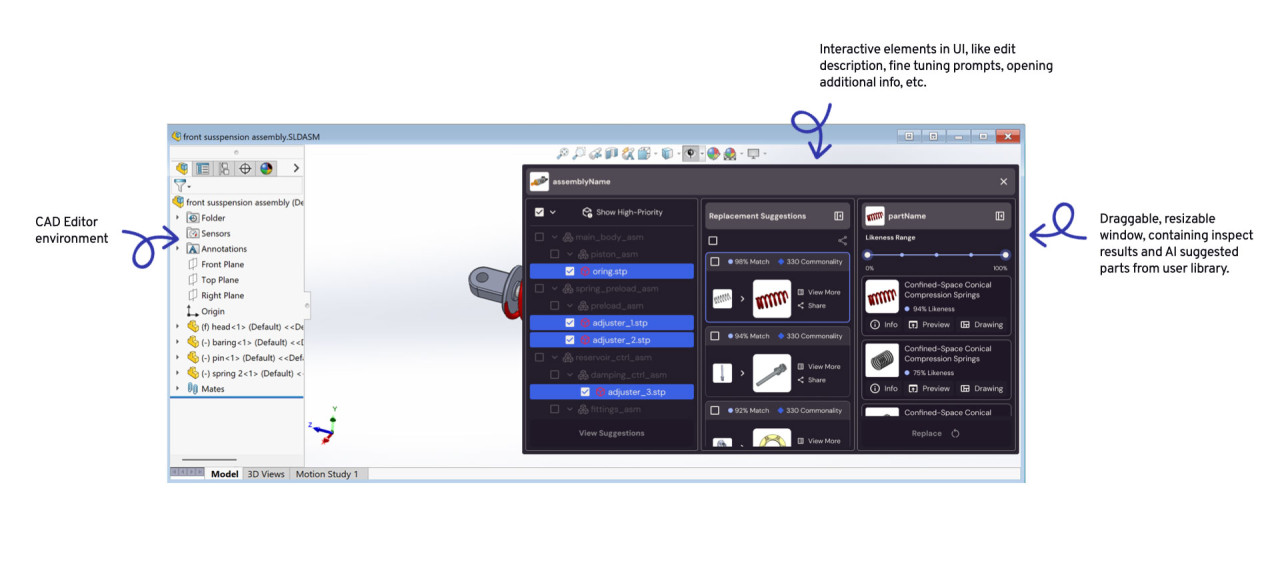
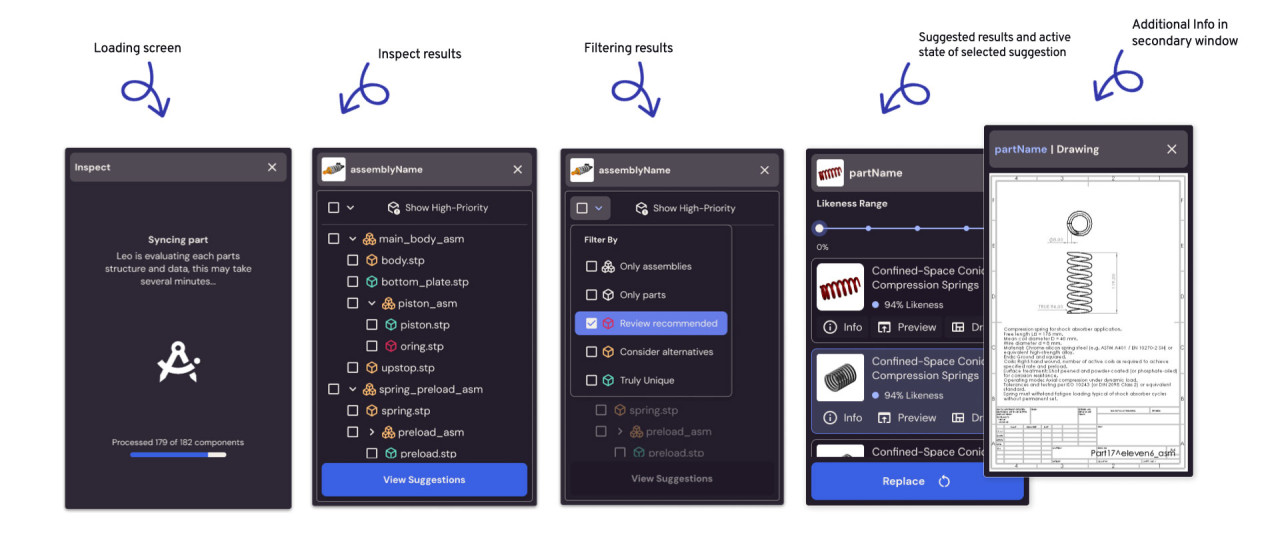
Prototyping the complete experience required also designing micro interactions to show developers not only the full flow of the interaction, but also the small details that compose it, like loading screens, hover states, additional info in secondary windows, inspect results, etc.
CAD Context UI